Install mumo in Cursor.
Two pieces: a one-click install link that writes the mumo server into your Cursor config, and a plugin that adds the auto-triggering skill and routing rule. No environment variables, no terminal, works the same on every OS.
Generate your API key
Sign in, create a mumo API key, and copy the value that starts with mmo_live_. You'll paste it in the next step.
Add mumo to Cursor
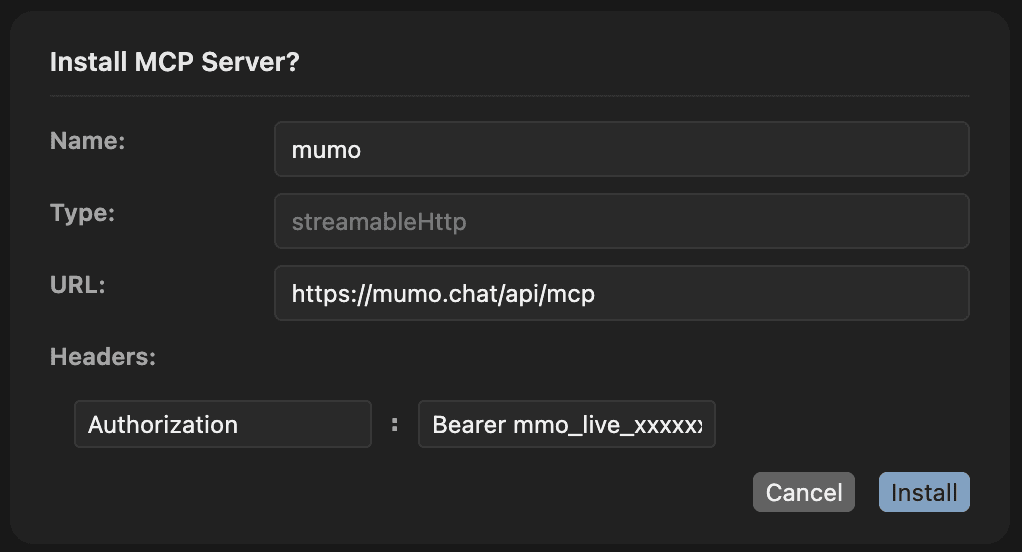
Paste your key and click. Cursor opens an Install MCP Server dialog pre-filled with the mumo server — review it and click Install. The server lands in your user-level MCP config: survives restarts and reboots, identical on macOS, Linux, and Windows.
Built in your browser — the key is never sent to us or stored on this page.
Prefer not to click a protocol link? Merge the same entry into ~/.cursor/mcp.json by hand — identical result:
{
  "mcpServers": {
    "mumo": {
      "url": "https://mumo.chat/api/mcp",
      "headers": {
        "Authorization": "Bearer mmo_live_YOUR_KEY_HERE"
      }
    }
  }
}
Either way, confirm in Cursor under Tools & MCP: the server named mumo shows green with its tools enabled.
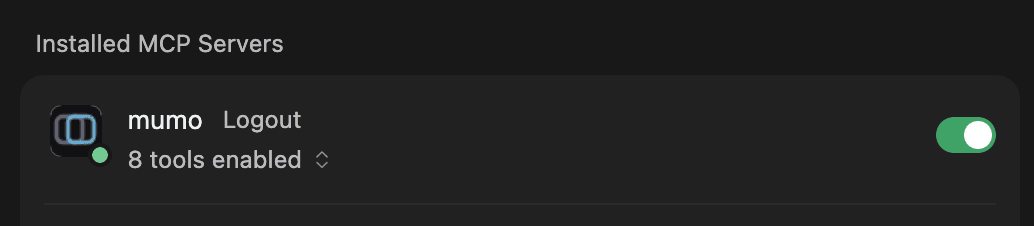
Keys are revocable any time from your dashboard. ~/.cursor/mcp.json now holds your live key — never commit a file holding a live key, dotfiles repos included.
Upgrading from the old mumo plugin? Uninstall it first (Cursor Settings → Plugins → mumo → Uninstall). Pre-0.6.0 versions bundled their own mumo server, which blocks this install silently — the dialog never appears. Reinstall the plugin in step 03 afterward; current versions ship no server.
Install the mumo plugin
The plugin adds the behavior layer — an auto-triggering skill and a routing rule. Sideload it while the Cursor marketplace listing rolls out. Either clone into Cursor's local plugins folder and reload:
git clone https://github.com/mumo-chat/mumo-cursor ~/.cursor/plugins/local/mumo
# then in Cursor: Command Palette → "Developer: Reload Window"
…or clone it anywhere and add that folder from Cursor's Plugins view. Either way it appears under Discover with one skill and one rule. It contributes no server of its own — the skill and rule bind to the tool names (create_deliberation, …) from the server you added in step 02.
Run your first deliberation
Cursor's rule system treats plugin rules and skills as soft priors. Name mumo explicitly the first time so the agent reaches for the panel instead of answering directly.
Ask mumo to compare Postgres and MongoDB for our event store.
Include the constraints from this repo and tell me where the models disagree.
Reliable invocations: “Ask mumo about…”, “Run this by a mumo panel”, “Get me a second opinion from mumo on…”. Vague phrasings like “ask a panel” may resolve to a generic response — the word mumo is what makes the routing stick.
Plugin source: github.com/mumo-chat/mumo-cursor · MCP tool reference · Other clients